 VyaparGrow
Google Business Profile for Small Businesses in India: The Complete Guide
A plain-language guide for small businesses in India: who can get a Google Business Profile, how to set it up and verify it, and what to fix first.

When someone nearby searches "salon near me" or "AC repair near me", Google shows a few businesses on a map before any website. If your shop is missing, or shows old hours, that customer calls the next one. Before you pay anyone, get a free Google profile check to see where yours stands.
This guide covers the whole profile in plain language: who can list, how to set it up and verify it, what a complete profile looks like, and how to keep it working every week. The rules here are based on Google's own help pages.
What is a Google Business Profile, and is it the same as Google My Business?
A Google Business Profile is your business's free listing on Google Search and Maps, and it is the same product that used to be called Google My Business. Google renamed it in late 2021.
Your profile shows your name, location or service area, hours, phone number, photos, reviews and posts. Customers use it to call you, get directions or visit your website without ever opening a search result.
Google states that creating a Business Profile and listing your business on Google is free. Anyone who charges you "to get on Google" is charging for their own time, not for Google.
Can every business in India get a Google Business Profile?
Most local businesses in India can get a Google Business Profile, as long as they meet customers in person during their stated hours. Google's business eligibility guidelines set the rules.
Shops, clinics, salons, cafés and garages that customers visit qualify. So do service businesses that travel to customers, like plumbers, AC technicians and pest control.
Some do not qualify. Online-only businesses, brands without a customer-facing location, and lead-generation companies are not eligible. Virtual offices are not allowed either. A co-working desk qualifies only with clear signage, staff on site, and customers served there during business hours.
If you work from home and customers do not visit you, you can list as a service-area business, as long as you visit or deliver to customers in person. You hide your home address and show the areas you serve instead: up to 20 cities or postal codes, within about 2 hours of driving from your base.
How to create and claim your Google Business Profile, step by step
To create a Google Business Profile, search for your business on Google Maps first, then claim it or add it at business.google.com. Many shops already have a listing that a customer or Google created.
Search for your business on Google Maps. If it appears, choose to claim it instead of creating a duplicate.
Enter your business name exactly as it appears on your signboard. Do not add keywords like "Best Salon in Pune".
Pick your primary category, the most specific one that says what you are.
Add your address or service area. Use your exact shop address, or hide it if customers do not visit.
Add a phone number and website that you control directly.
Verify the profile using the method Google offers.
If someone else already claimed your listing, such as a former employee or an old agency, you can request access through Google instead of creating a second profile. The current owner has 3 days to respond.
Service businesses without a shop cannot use the request form and need to contact Google Business Profile support instead. Either way, do not create a duplicate: Google allows only one profile per location.
Click here to view Google Business Profile Optimization Checklist.
How does Google Business Profile verification work in India?
Google Business Profile verification is how Google confirms you run the business, and Google decides which method you get. The verification help page lists phone or text, email, video recording, live video call and postcard.
You cannot choose the method yourself. Google picks it based on your business type, region and the information it has. If more than one option appears, you can try another. A live video call is only possible during your business hours.
Most reviews take up to 5 business days, though rare cases take longer. If you get a postcard, most codes arrive within 14 days and expire after 30 days.
Google recommends video verification where it is available. The video must be at least 30 seconds, recorded in one take from your phone, with no edits. It should show:
Where you are: the street, building number or nearby landmarks.
That the business exists: your signboard, or for service businesses, your tools, van or branded uniform.
That you manage it: the counter, kitchen or storeroom, or a business invoice or permit in your business name.
If verification is still pending after 5 business days, check that your video met the points above, try another method if Google offers one, and then contact Google Business Profile support. Do not create a new listing.
What does a complete Google Business Profile look like?
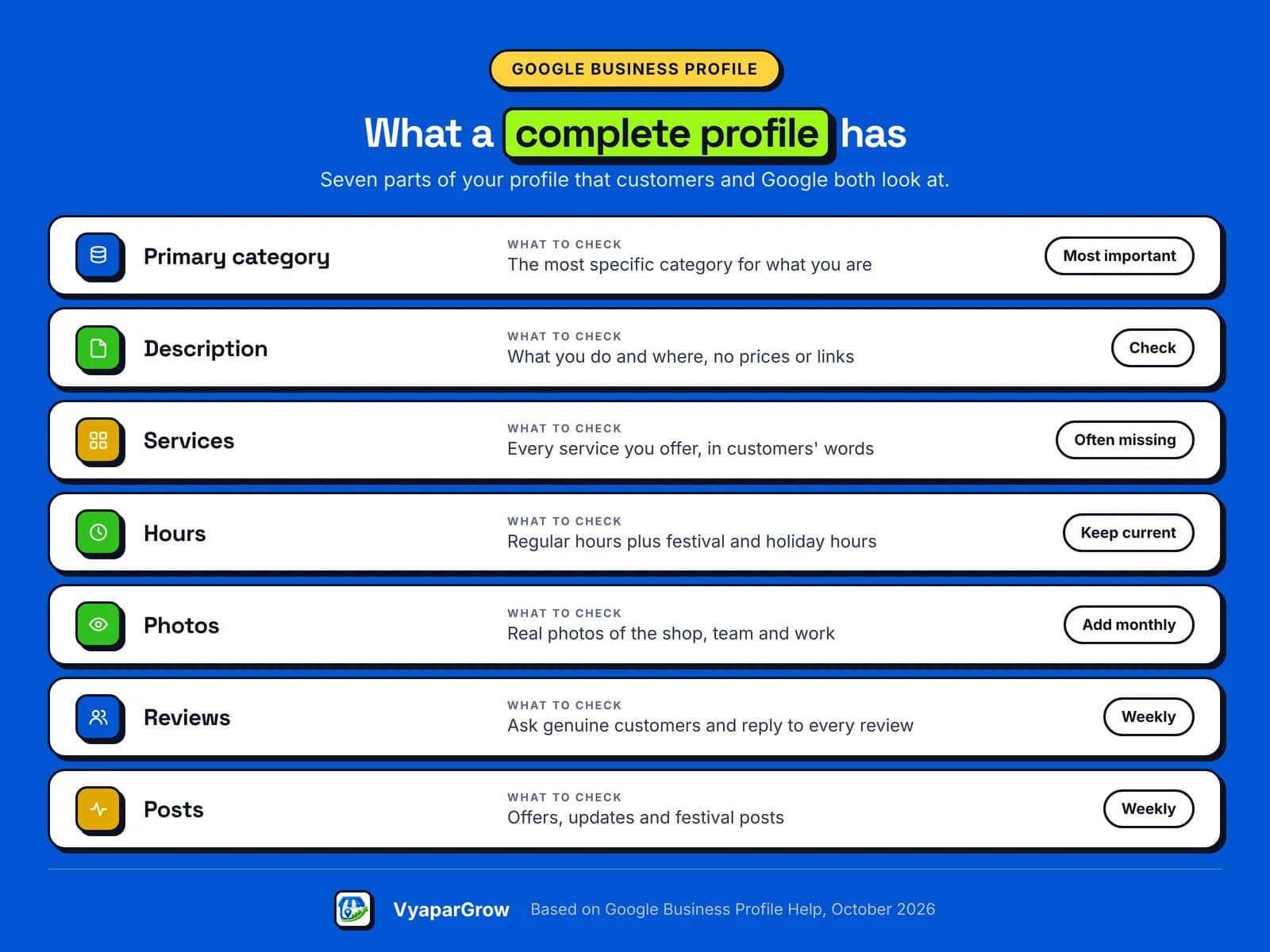
A complete Google Business Profile answers every question a customer would ask before calling you, using the fields Google provides. Use this table to check yours.
Section | What to fill in | Common mistake |
|---|---|---|
Primary category | The most specific category for what you are | Choosing a broad category like "Shop" |
Description | What you do, who you serve and where, in up to 750 characters | Adding links (not allowed) or prices and offers (Google advises against) |
Services | Every service, in your customers' words | Leaving it empty |
Hours | Regular hours plus holiday and festival hours | Old hours after a change |
Photos | Real photos of your shop, team and work | Only a logo, or stock images |
Phone and website | A number you answer, your own site or booking link | A personal number nobody picks up |
Reviews and posts | Replies to reviews, regular updates | No activity for months |
Google's guidelines say to use the fewest categories needed, and to pick categories that describe what your business is, not what it sells.
How does Google decide which shop shows first?
Google says local results are mainly based on relevance, distance and popularity, and that there is no way to pay for a better local ranking. Google explains each factor in its local ranking guidance.
Relevance: how well your profile matches the search. A complete, accurate profile helps.
Distance: how far you are from the person searching. You cannot change this.
Popularity (Google also calls it prominence): how well known you are, including your reviews, ratings and links from other websites.
So the parts you control are relevance and popularity. Fill in every field, keep it accurate, and earn genuine reviews over time. Anyone who promises the number one spot is not being straight with you.
Reviews and posts: keeping your Google Business Profile active
An active Google Business Profile, with replies to reviews and regular posts, shows customers that someone is looking after the business. Google says replying to reviews shows you value feedback.
Getting reviews the right way: ask every customer, not only the happy ones, and never pressure anyone. Share your review link on WhatsApp or print it as a QR code at the counter. Google's policy does not allow:
paying for reviews or giving discounts or freebies in return,
asking only customers you expect to leave good reviews,
discouraging or blocking negative reviews.
Replying: reply where you can say something useful, like answering a question or sharing an update, rather than the same thank-you every time. Keep it short and never share a customer's private details. For a bad review, stay calm, apologise, and offer to sort it out by phone.
Posting: use Google posts for offers, new services, events and festival timings. A post before Diwali, Navratri or Pongal saying when you are open saves customers a wasted trip.
Want to see how your own profile measures up? VyaparGrow's GBP Health Audit is being built to do exactly that, and early waitlist members get a free profile check.
Google profile tips for local businesses by industry
What a strong Google Business Profile needs depends on your industry, because customers search differently for a salon than for an AC repair. The basics stay the same; the details change.
Industry | Common gap | Fix | What VyaparGrow is designed to do |
|---|---|---|---|
Salon or beauty studio | Services not listed, so "bridal makeup near me" misses you | List every service by name | Suggests missing services from your category |
Café or restaurant | Menu and hours out of date | Update the menu and festival hours | Business information checks flag old hours |
AC or appliance repair | No service area set | Hide your address, add the areas you serve | Checks eligibility and service-area setup |
Car or bike garage | Few photos, so no trust | Add photos of the workshop and finished work | Weekly plan suggests what to update next |
Gaming zone or turf | No booking link or pricing details | Add a booking link and facility details | Drafts posts for events and seasonal offers |
Home baker or tiffin | Unsure if they can list at all | List as a service-area business if eligible | Runs the eligibility check before setup |
VyaparGrow is designing industry starter templates for these and other local categories.
Mistakes that get Google Business Profiles suspended (and scam calls to ignore)
Google can suspend a Business Profile that breaks its guidelines on names, addresses and duplicate listings, and every one of these mistakes is avoidable. Watch for these:
Keywords in the business name, like "Sharma Electricals Best Electrician Jaipur".
A fake or virtual address, or a home address shown when customers do not visit.
Duplicate profiles for the same location.
A phone number that redirects to someone else.
Watch out for scam calls too. Google says it will never ask for payment information over the phone or guarantee you a special spot. If a caller claims to be "from Google" and asks for money to verify or protect your listing, hang up.
Do it yourself, hire an agency, or use a tool?
Most small businesses can run their own Google Business Profile, because it is free and needs only a little time each week once it is set up. The hard part is keeping it up.
Do it yourself if you have the time and like doing it. Everything in this guide is free.
Hire someone if you have several branches or no time at all. Make sure you stay the owner and add them as a manager. Google's rules say representatives must never claim a profile without the owner's consent and must hand ownership back on request.
Use a tool if you want the weekly work done for you but still want the final say.
Red flags with anyone you hire: asking for your Google password, keeping ownership of your profile, or promising a guaranteed spot on the map.
How VyaparGrow helps with your Google Business Profile
VyaparGrow AI Agent is being built to do the weekly profile work for you, while you approve everything before it goes live. It is in development, with a pilot planned for early 2027.
GBP Health Audit: checks your profile and lists the fixes that matter most.
Guided onboarding and eligibility check: tells you whether and how your business can list.
Brand-consistent Google posts: drafts posts for offers, updates and festivals.
AI Review Assistant: drafts replies to your reviews in your voice.
Nothing is published until you tap approve. You can read more about how VyaparGrow works.
Google Business Profile in practice: an illustrative example
Here is how a weekly plan could look for a salon, using illustrative sample data, not a real customer result. "Glow Beauty Studio" is a sample business from our website.
The audit scores the sample profile 61 out of 100 and suggests three actions for the week:
High impact: add "Bridal makeup" as a service, because it is missing from the profile.
High impact: reply to a 4-star review from a customer named Priya.
Medium: post Diwali timings, "open till 9 pm".
The owner reviews each item and taps approve. Nothing goes live until then. Real pilot results will replace this example once they exist.
The bottom line on Google Business Profile in India
For a local business in India, a complete and active Google Business Profile is free, takes little time, and is often the first impression a customer gets. Start with the basics.
Claim your listing, fix the name, category, hours and services, then verify it. After that, spend a little time each week on reviews, photos and posts. That routine matters more than any trick.
Ready to see how your Google profile scores?
Join the VyaparGrow waitlist for free, and early members get a check of their Google Business Profile. Get a free Google profile check and see what to fix first. No payment needed.
Frequently asked questions
Is Google Business Profile free in India?
Yes. Google says creating a Business Profile and listing your business on Google is free. You only pay if you choose to hire someone or use a paid tool to manage it.
Is Google My Business the same as Google Business Profile?
Yes. Google renamed Google My Business to Google Business Profile in late 2021. It is the same free listing on Google Search and Maps.
Can I create a Google Business Profile without a shop?
Yes, if you serve customers in person at their location. List as a service-area business, hide your home address, and add up to 20 areas you serve. Online-only businesses are not eligible.
How long does Google Business Profile verification take?
Google says most verification reviews take up to 5 business days, though rare cases take longer. If Google sends a postcard, most codes arrive within 14 days.
Why can't I choose my verification method?
Google decides the available methods based on your business type, region and the information it has. If more than one option is shown, you can try another one.
Can I manage my Google Business Profile from my phone?
Yes. On mobile you can manage your profile in the Google Maps app, and on a computer directly from Google Search.
What should I do if someone else already claimed my business on Google?
Request access through Google instead of creating a second profile; the current owner has 3 days to respond. Businesses without a shop contact Google support instead. Duplicate profiles can get suspended.
Can I pay Google to show my shop first on Maps?
No. Google says there is no way to request or pay for a better local ranking. Google Ads is a separate, paid product.