 VyaparGrow
Google Business Profile Optimization Checklist: 25 Fixes for Local Businesses
A 25-point checklist to optimize your Google Business Profile: what to fix first, how to fix it, and how often to check it again. Free PDF included.

Your shop is on Google Maps, but the phone is not ringing. Usually it is not one big problem but a handful of small gaps: a broad category, no services listed, old festival hours, three photos from years ago. If you want to know your gaps first, get a free Google profile check.
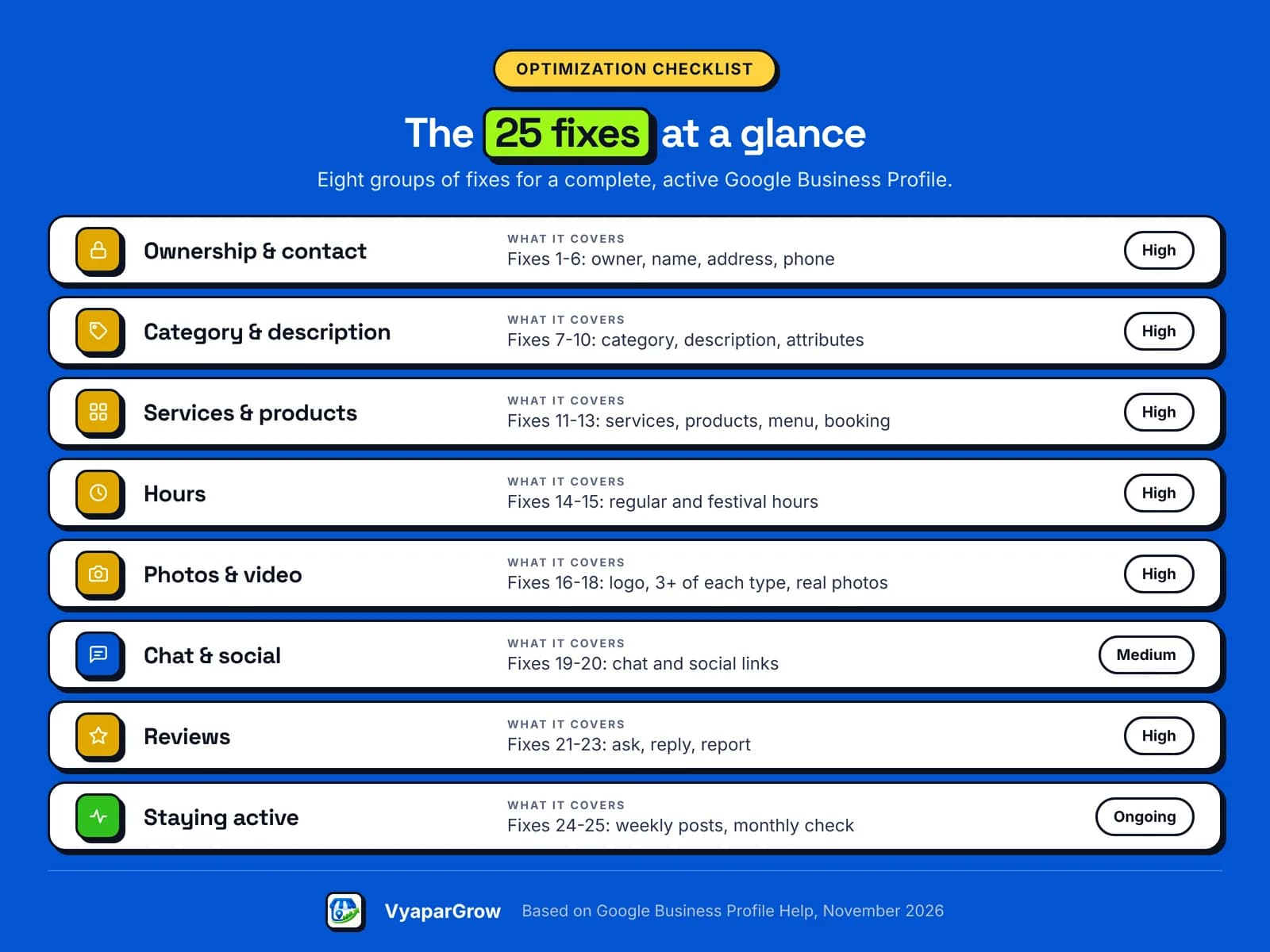
This checklist covers 25 fixes in order of what matters most, each with what to check and how to fix it. If you are still setting up your profile, start with our Google Business Profile guide for small businesses in India.
How do you optimize a Google Business Profile?
You optimize a Google Business Profile by working through it section by section: ownership and contact details first, then categories and services, hours, photos, reviews and regular posts. Each fix below is marked by priority.
If you know it by its old name, this is the same as a GMB optimization checklist, from the days when it was called Google My Business.
High: fix this week. These affect whether customers find you and trust what they see.
Medium: fix this month. These make your profile more complete and easier to act on.
Ongoing: a habit, not a one-time task.
Short on time? Start with five fixes: your business name (fix 3), primary category (fix 7), services (fix 11), festival hours (fix 15) and photos (fix 17).
Prefer to tick it off on paper? Download the 25-point checklist as a free PDF, print it, and keep it at the counter.
Fixes 1 to 6: ownership, name, address and contact details
Get ownership and contact details exactly right first, because every other fix depends on customers trusting and reaching the business they see. These six are mostly High priority.
1. Make sure you are the primary owner (High). A profile can have several owners but only one primary owner. That should be you. Add your agency or staff as managers: they can edit the profile but cannot add or remove people.
2. Remove duplicate profiles (High). Search your business name on Google Maps. If two listings show up for the same place, report the duplicate on Maps. If you created one by mistake, remove it from your account.
3. Use your real business name (High). Use the name customers see on your signboard, website and bills. Google's guidelines for representing your business do not allow extra service or area words in the name, so "Sharma Electricals" is right and "Sharma Electricals Best Electrician Pune" is not.
4. Set your exact address or service area (High). If customers visit you, use your exact address and check the map pin. If you travel to customers, hide your address and add up to 20 service areas within about 2 hours' drive of your base.
5. Add a phone number you answer (High). Use a number under your direct control that someone picks up during business hours. Google does not allow numbers that redirect to another business or premium-rate numbers.
6. Add a website or booking link that works (Medium). Open the link from your phone and check it loads. If you have no website yet, a working booking page or your WhatsApp catalogue is better than a dead link.
Fixes 7 to 10: categories, description and attributes
Categories tell Google what you are, so the primary category is one of the most important choices on the whole profile. The description and attributes then fill in the detail customers look for.
7. Choose the most specific primary category (High). Pick the category that best describes your business, such as "Beauty salon" rather than a broad one. Google advises choosing a specific category from the list and falling back to a general one only if nothing fits.
8. Add a few accurate additional categories (Medium). Add categories for real departments or services, like a grocery store that also has a bakery. Do not add one for every product you sell; Google's help pages say not to.
9. Write a clear description (Medium). Explain what you do, who you serve and where, in up to 750 characters. Links are not allowed, and Google asks you to focus on the business rather than offers, prices or sales.
10. Turn on the attributes that apply (Medium). Attributes cover details like payment options, Wi-Fi, wheelchair access or a women-owned business. Open Edit profile, then More, and set each one that is true for you. Some depend on your category or country.
Fixes 11 to 13: services, products and menus
Services and products show customers exactly what you offer, and they are often the first thing missing from an otherwise complete profile. Fill in whatever your category allows.
11. List every service in your customers' words (High). Use the services Google suggests for your category, then add your own, like "AC gas refill" or "Bridal makeup". Keep prices and phone numbers out of service names: Google rejects those automatically. Add prices in the service details instead.
12. Add your main products (Medium). Retail shops can show products with photos. Google's automatic in-store product listing works only in a few countries outside India, so add your best sellers manually from your profile.
13. Add a menu or booking link (Medium). Restaurants and cafés should add a menu link; salons, clinics, gaming zones and turfs should add a booking link. Customers then act straight from Google instead of calling to ask.
Fixes 14 and 15: hours, including festival and holiday hours
Accurate hours stop customers from arriving at a closed shutter, which is one of the fastest ways to lose a customer and earn a bad review. Check both regular and special hours.
14. Keep regular hours accurate (High). Set the hours customers can actually visit or call. If your timings change for the season, update them the same day.
15. Set special hours before every festival (High). Use special hours for Diwali, Navratri, Pongal, Eid, Christmas and other holidays. Google's help page on special hours suggests confirming official holiday hours even when they match your regular ones.
Closed for 7 days or more? Mark the business temporarily closed instead of setting special hours.
How many photos should a Google Business Profile have?
Google suggests at least three photos of each type that fits your business, such as exterior, interior, products, work and team, plus a logo and cover photo. Real photos help customers recognize your shop when they arrive.
16. Add a logo and a cover photo (Medium). The logo helps customers recognize you, and the cover photo sits at the top of your profile. Pick the image that best represents your business.
17. Add at least three photos of each type (High). Google's photo tips for Business Profiles suggest at least three exterior, interior, product, at-work and team photos, depending on your business. Show the entrance clearly so first-time visitors find you.
18. Use real, well-lit photos in the right format (Medium). Photos should be JPG or PNG, between 10 KB and 5 MB, ideally 720 by 720 pixels. Google asks for photos without major edits or excessive filters or AI. Videos can be up to 30 seconds.
Fixes 19 and 20: chat and social links
Chat and social links give customers more ways to reach you, but Google offers them only in some regions, so check whether they appear in your profile. Add them if they do.
19. Turn on chat if your profile offers it (Medium). Open Edit profile, then Contact. If you see a Chat option, add your WhatsApp click-to-chat link or a number that receives text messages. If both are added, Google shows only the text option.
20. Link your social profiles (Medium). In the same Contact section, look for Social profiles. You can add one link each for platforms like Facebook, Instagram, YouTube and LinkedIn, where the option is available.
Fixes 21 to 23: reviews
Reviews are where customers decide whether to trust you, so ask for them honestly, reply to them well, and report the ones that break Google's rules.
21. Ask every customer for a review (High). Share your review link on WhatsApp after a job, or print the QR code at the counter. Ask everyone, not only happy customers, and never offer discounts or gifts in return. Google's policy does not allow either.
22. Reply in a short, useful way (Medium). Reply where you can answer a question or share an update, rather than sending the same thank-you each time. Keep it short and never share a customer's private details.
23. Report reviews that break the rules (Medium). Use Google's Reviews Management Tool to report spam, fake or abusive reviews. Only reviews that break Google's policies are removed, so do not report a review just because you disagree with it.
How often should you update your Google Business Profile?
Update your Google Business Profile whenever something changes, post at least once a week, and do a short check every month. These last two fixes keep everything above from going out of date.
24. Post regularly (Ongoing). Use the three post types: updates for news, offers for deals and events for dates. Google's own playbook for service businesses recommends posting at least once a week. Posts are archived after six months unless you set dates.
25. Do a 10-minute check every month (Ongoing). Check your hours before the next festival, look at calls and direction requests in Performance, and review who has access. Remove former staff or agencies who no longer need it.
That is a lot to keep track of every week, and it is exactly the work VyaparGrow is being built to take off your hands.
Which fixes matter most for your type of business?
Every fix helps, but a few matter more depending on how customers find and choose your kind of business. Use this table to decide what to do first.
Business type | Fixes that matter most | What VyaparGrow is designed to do |
|---|---|---|
Salon or beauty studio | Services (11), booking link (13), photos of work (17) | Suggest services missing for your category |
Café or restaurant | Menu link (13), festival hours (15), food photos (17) | Flag hours that need updating before festivals |
AC or appliance repair | Service area (4), services (11), quick replies to reviews (22) | Check eligibility and service-area setup |
Car or bike garage | Category (7), services (11), workshop photos (17) | Show which fixes to make first each week |
Gaming zone or turf | Booking link (13), event posts (24), interior photos (17) | Draft posts for events and seasonal offers |
Retail shop | Products (12), hours (14), exterior photos (17) | Flag profile gaps in a weekly plan |
VyaparGrow is designing industry starter templates for these and other local categories.
Mistakes that undo your optimization
Some shortcuts look like optimization but break Google's guidelines. Some only get an edit rejected or a photo removed; the worst can get a profile suspended. Avoid these:
Extra words in your business name, like "best", a service or your area.
Buying reviews or asking only happy customers for them.
Heavily edited or AI-altered photos that do not show your real shop.
Prices or phone numbers in service names, which Google rejects.
A phone number that redirects to someone else.
Our Google Business Profile guide explains the suspension risks in more detail.
How VyaparGrow helps with Google Business Profile optimization
VyaparGrow AI Agent is being built to check your profile against fixes like these every week and tell you which ones matter most, while you approve every change. It is in development, with a pilot planned for early 2027.
GBP Health Audit: checks your profile and lists the fixes that matter most.
Category and service recommendations: suggests what is missing for your type of business.
Brand-consistent Google posts: drafts regular posts for offers, updates and festivals.
AI Review Assistant: drafts replies to reviews in your voice.
Nothing goes live until you tap approve. See how VyaparGrow works.
Google Business Profile optimization in practice: an illustrative example
Here is how the checklist could look for an AC repair business, using an illustrative sample, not a real business or customer result. "CoolAir AC Services" in Pune is made up for this example.
The owner works from home and travels to customers. Going through the checklist, the sample profile shows four gaps:
Fix 4: the home address is visible, and no service areas are set.
Fix 11: only "AC repair" is listed, with no "AC gas refill" or "split AC installation".
Fix 15: no special hours for Diwali.
Fix 17: only two photos, both of the van.
The owner hides the address, adds six service areas, lists four services, sets Diwali hours and adds photos of the team at work. That is about an hour of work, done once, plus the weekly habits in fixes 24 and 25.
The bottom line on Google Business Profile optimization
A well-optimized Google Business Profile is mostly about accuracy and habit, not tricks. Get the basics exact once, then keep it active every week.
Start with the five fixes marked above, then work through the rest over a month. Repeat the monthly check, and your profile will stay ahead of the shop next door that set theirs up years ago and forgot it.
Ready to check your profile against all 25 fixes?
Join the VyaparGrow waitlist for free, and early members get a check of their Google Business Profile. Get a free Google profile check and see which fixes to make first. No payment needed.
Frequently asked questions
How long do changes to my Business Profile take to show on Google?
Google reviews edits before they go live. Attribute changes are usually reviewed within about 10 minutes but can take up to 30 days, and once approved, service-area changes can take up to 48 hours to show.
How many photos should I add to my Business Profile?
Google suggests at least three photos of each type that fits your business, such as exterior, interior, products, at work and team, plus a logo and cover photo.
How often should I post on my Business Profile?
Google's own playbook for service businesses recommends posting at least once a week. Posts are archived after six months unless you set a date range.
Does adding keywords to my business name help?
No. Google's guidelines say to use your real-world business name, as on your signboard, without extra service or location words. Adding them can lead to your profile being suspended.
Can I add prices to my services?
Yes, in the service details. Keep prices and phone numbers out of custom service names, because Google rejects those automatically.
Will optimizing my profile put me at the top of Google Maps?
No one can promise that. Google says local results are mainly based on relevance, distance and popularity, and that there is no way to pay for a better local ranking.
Who should own my Business Profile, me or my agency?
You. A profile has one primary owner, and that should be the business owner. Add your agency as a manager: managers can edit the profile but cannot add or remove people.
Is this checklist available as a PDF?
Yes. You can download the 25-point checklist as a free PDF from this page and print it.