 VyaparGrow
Google Business Profile Phone Number Not Showing? 14 Reasons and How to Fix Each
Phone number missing or wrong on your Google Business Profile? Here are the 14 reasons it happens, from pending edits and hidden settings to regional phone checks, and how to fix each one.

A customer finds you on Google, taps your profile, and there is no number to call. Or worse, the number rings someone else. Either way, that customer goes to the next business on the list. A free Google profile check can show you which problem you have.
The good news: there are only a handful of reasons a phone number goes missing, and most take minutes to fix. This guide covers all 14, what each looks like, and how to fix it.
First, check what customers actually see
Start with a 2-minute check, because what you see as the owner is not always what customers see. These four steps point you to the right fix.
Search like a customer. On another phone, signed out or in an incognito window, search your business name. Open your profile in Google Search and in the Google Maps app.
Check the edit status. Open your profile where you manage it and look at the phone number. Google shows an edit as pending (still under review), not approved or accepted.
Check whether the number is hidden. Go to Business Profile settings, then Advanced settings, where you can show or hide your phone number.
Check who can edit. In Business Profile settings, open People and access to see every owner and manager.
What you see | Likely reason | Go to |
|---|---|---|
No number anywhere, even in Edit profile | Never added, or you are looking at a duplicate | Reasons 1 and 3 |
Number marked pending (under review) | Still in Google's review | Reason 4 |
Number marked not approved | Google could not confirm it | Reason 5 |
Number in Edit profile, missing for customers | Hidden, not verified, or a display issue | Reasons 2, 6, 13 and 14 |
A number you never added | A Google update, a suggested edit or another manager | Reasons 7 and 8 |
Whole profile gone | Suspended or removed | Reason 12 |
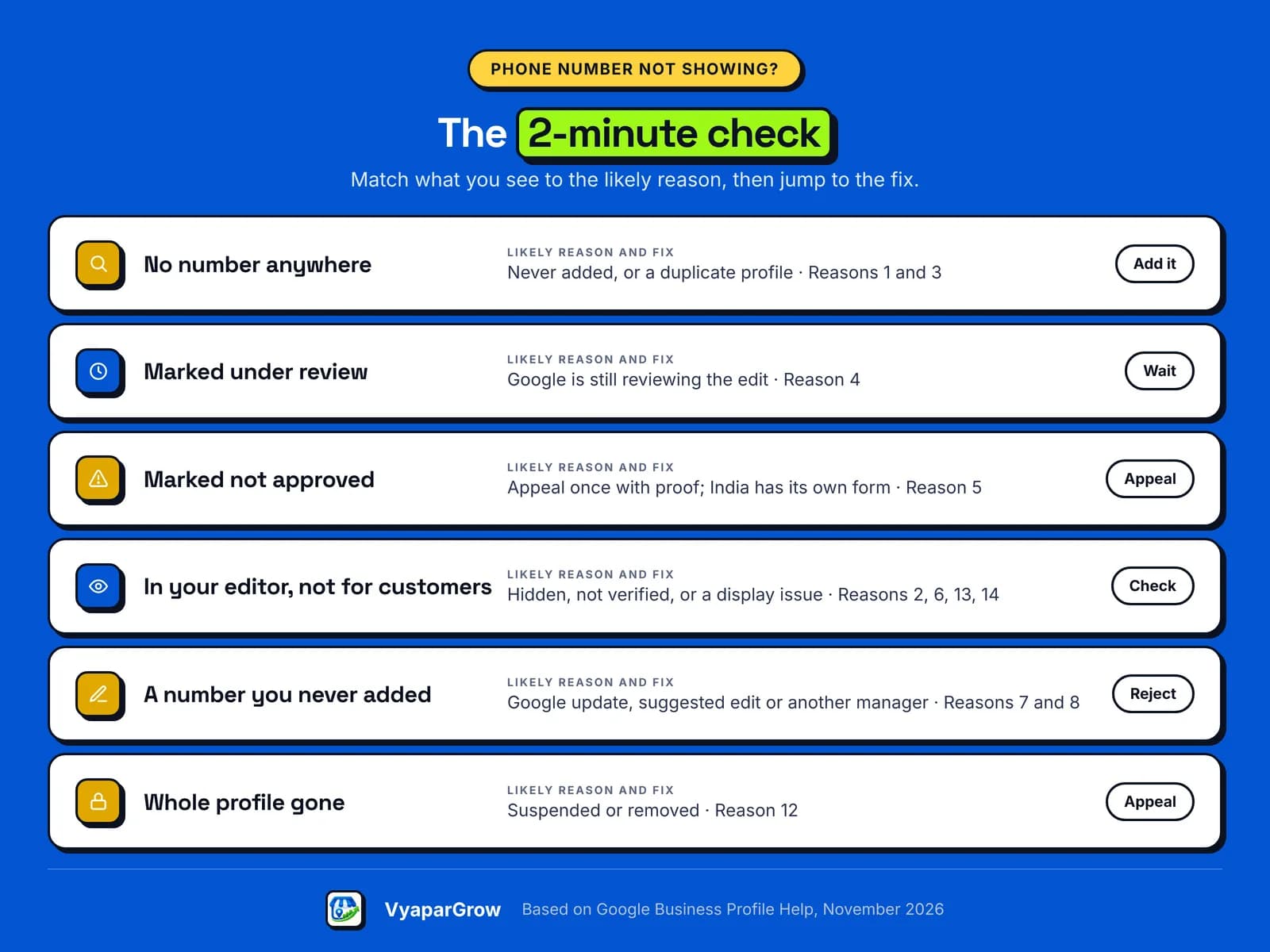
14 reasons your phone number isn't showing, and how to fix each
Most missing numbers fall into six groups: missing or hidden, not yet approved, changed by someone else, against Google's rules, a problem with the whole profile, or there but not visible to customers. Find your group below.
The number is missing or hidden
1. The number was never added, or customers see a duplicate profile. Sometimes the number was saved on a different profile than the one customers find. Search your business name on Google Maps and look for a second listing.
If you created a duplicate by mistake, remove it from your account. If not, report it on Google Maps. Then add your number to the right profile: Edit profile, then Contact, then Phone number.
2. The number is hidden in your settings. Google lets you hide your phone number, and some owners do this for privacy without realizing customers can no longer call. Go to Business Profile settings, then Advanced settings, and show it again.
If privacy is the worry, hide your address instead (if customers don't visit you) and use a separate business number.
3. The number was entered wrongly. The wrong country or extra digits can stop a number working, and fax numbers can't be added at all.
When you add the number, choose your country first. You don't need to type the country code (such as +1, +44 or +91) or dashes, because Google formats it. For a landline, include the area code.
Google hasn't approved it yet
4. The edit is still under review. Google reviews your changes before they go live. Most reviews take up to 10 minutes, but some take up to 30 days. Check the status and wait. Our advice: don't keep submitting the same number while it is pending.
5. Google marked your number "not approved". Google may not approve a change if it can't confirm the number is accurate. First, check the number follows Google's rules (reasons 9 to 11). Then make sure the same number appears on your website, signboard and other listings, so it is easy to confirm.
If the edit is rejected, you can ask Google to look again. Businesses in the UK and EEA use Google's appeals tool, where each decision can be appealed once. Businesses everywhere else use the Contact us route on the same Google appeals page. A decision can take up to 5 business days.
Add evidence such as a business phone bill or business registration. Google asks that the business name and address on your documents match your Business Profile.
In India: the extra phone number check
India has its own process: Google has a separate appeal form for phone numbers there. According to a Google Product Expert on the Business Profile community forum, extra checks on phone number edits have applied in India since October 2021.
The Submit India Phone Number Appeal form asks for your business details, including your Business Profile ID, the email address that manages your profile, and the number you want to add.
Businesses with 10 or more profiles can send them in bulk, with an attachment listing each Business Profile ID and proof for each.
In India, submit the edit once, then send this form. If the edit is still rejected, appeal through Contact us as described above.
6. Your profile isn't verified, or Google asked you to verify again. Some businesses must verify before they can change their information, and you need to verify to manage your profile fully. If Google asks you to verify again, it is usually because some business details changed recently.
Our setup and verification guide walks through each step.
Phone or text verification needs a number a person can answer. Automated phone menus (IVR systems) can't receive the code. If the code never arrives, try another method Google offers you.
Someone or something changed it
7. A Google update or a customer's suggested edit replaced it. Google gathers business information from different sources, including user reports and licensed content, and anyone can suggest an edit. Changes from Google show in blue in your profile editor, with a notification at the top.
You have 4 days to accept or reject a suggested edit. After that, Google may publish it if other public information supports it, such as an old number still on your website. Reject wrong changes, re-enter your number, and update it everywhere it appears online.
8. Another manager, an old agency or a connected tool changed it. Open People and access and remove anyone who should no longer manage your profile. Only owners can remove other owners and managers.
If someone else owns the profile, such as a former agency or employee, request ownership at business.google.com/add. The current owner has 3 days to respond, and if they don't, you may be able to claim the profile.
In our experience, some listing tools push old data back to Google, so disconnect any you no longer use.
The number breaks Google's rules
9. It isn't a number your business controls. Google says the number must be under the direct control of the business, and it should not refer callers to a landing page. Premium-rate numbers are not allowed. Use a local number rather than a central call center helpline where possible.
A delivery app's number, a directory's lead number or an agency's number is not under your control, so replace it with your own.
10. The same number is used by several businesses. Google asks for a number that connects to your individual business as directly as possible. If one mobile number sits on two unrelated businesses, or on every branch of a chain, give each business or branch its own local number where possible.
11. The number is in the wrong place. Google may remove posts with unverified contact information, including phone numbers. Use the post's "Call now" button instead, which uses your verified profile number.
Keep phone numbers out of your business name too, and out of custom service names: Google automatically rejects custom services that break its policies, such as names with prices or phone numbers.
The whole profile is affected
12. Your profile is suspended or removed. If the whole profile has gone, not just the number, check for an email or notice from Google. Fix the cause, then use Google's appeals tool. You can appeal each decision only once, so include your evidence the first time.
It's on your profile, but customers can't see or use it
13. You see one thing, customers see another. In our experience, what you see as the owner can differ from what customers see for a while, especially in an app that hasn't refreshed. Test signed out, on another device.
Also check the tap-to-call link on your own website, which may still dial an old number. If you run Google Ads, check the number in your ads too.
14. Google's layout doesn't show a call button in every view. Google decides how each search result looks.
Third-party reports describe tests of local results without a call button, in Australia in October 2025 and in a 2026 study of local searches. Reports from 2024 also said hotel results moved the number under the About tab.
Google has not confirmed these changes. You can't control Google's layout, so open your full profile to check the number is there, keep the profile complete, and add chat as a second way to reach you.
How do you add or change the phone number on Google Business Profile?
You add or change your number in Edit profile, under Contact, on a computer or in the Google Maps app. Here are both ways.
On a computer: open your Business Profile, select Edit profile, then Contact. Next to Phone number, select the pencil, choose your country, enter the number and select Save.
On a phone: open the Google Maps app, tap Business at the bottom right, tap Edit profile, make the change and tap Save.
Next to your primary number, you can add up to 2 more numbers. The full steps are on Google's add your phone number page.
Make one change at a time, then wait for the review. Keep the same number on your signboard, website, visiting card and other listings, because a number that matches everywhere is easier for Google to confirm.
Which phone number should your business use?
Use a number your business controls and answers, and keep it the same everywhere. Here is what works for different businesses.
Business | Best primary number | Tip |
|---|---|---|
Solo tradesperson (plumber, electrician, technician) | A dedicated business mobile | It must be able to receive a verification call or text |
Shop, salon, café or garage | The shop's own landline or mobile | Add the owner's mobile as an additional number |
Restaurant on delivery apps | Your own number | Never a delivery app's or directory's number |
Home-based business | A separate business line | Hide your address, not your number |
Several branches | Each branch's own local number | Add a central line as an additional number |
New business | A number you will keep | Avoid changing it during verification |
How do you make sure customers can actually reach you?
Once the number shows, check that calls get through and give customers a second way to reach you. A few habits help.
Watch your Performance numbers. In Performance, calls are the number of times customers clicked the call button on your profile. Google stopped showing call history on 31 July 2024, so use your phone's call log to see who called.
Make a test call. Ask a friend to find you on Google and tap Call.
Add chat where it's offered. In Edit profile, under Contact, you may be able to add a WhatsApp link or a text number. If you add both, only the text option shows, and chat is only available in some regions.
Check monthly. Our Google Business Profile optimization checklist includes a 10-minute monthly check.
Once your number is public, you may get calls claiming to be from Google. Google says it will never ask for payment information over the phone. If you get suspicious calls, you can report them to Google through its webform. In the US, you can also complain to the FTC.
How VyaparGrow helps keep your contact details right
VyaparGrow is being built to catch problems like a missing or changed phone number before customers do. It is in development, with a pilot planned for early 2027.
Business information checks: flag when your number, hours or other details are missing or have changed.
GBP Health Audit: checks your whole profile and lists the fixes that matter most.
You stay in control: nothing changes on your profile until you approve it.
See how VyaparGrow works.
Phone number problems in practice: two illustrative examples
These two examples are made up, to show how the fixes work together. They are not real businesses or results.
A technician whose new number stays "not approved". Ravi, an AC repair technician, changes to a new mobile number. A week later it still says not approved.
He adds the new number to his website and visiting cards, then appeals once with a phone bill in his business name. In India, he sends the phone number form first. While he waits, he adds a WhatsApp chat link so customers can still reach him.
A café whose number was swapped. Maria runs a café that also takes orders through a delivery app. A suggested edit replaces her number with the app's support line, and calls dry up.
She spots the blue Google update in her editor, rejects it within 4 days, and updates the old number on her website so it can't come back.
The bottom line on a missing phone number
A missing phone number is almost always fixable: check what customers see, find the reason, and fix that one thing. Start with the status of your phone number edit.
Then check your settings, check who has access, and make sure the same number appears everywhere. If Google says not approved, appeal once with proof, using the India form if you are in India.
Ready to make sure customers can call you?
VyaparGrow is building an AI Growth Manager for local businesses, starting with your Google Business Profile. Join the VyaparGrow waitlist and early members get a free Google profile check.
Frequently asked questions
Why does my Google Business Profile say "phone number not approved"?
Google may not approve a change if it can't confirm the number is accurate. Check the number follows Google's rules and matches your website, then appeal once with proof. In India, use Google's India phone number form first.
How long does a new phone number take to show on Google?
Google says most edits take up to 10 minutes to review, but some take up to 30 days. Check the status rather than submitting the number again.
Can I add more than one phone number?
Yes. Next to your primary number, you can add up to 2 more phone numbers. Make the number you most want customers to call your primary number.
Can I use my personal mobile or WhatsApp number?
Yes, as long as your business controls it and someone answers it. For WhatsApp messages, you can also add a WhatsApp chat link under Contact, where chat is offered in your region.
Can I hide my phone number?
Yes. Go to Business Profile settings (under More), then Advanced settings, and hide your phone number. Customers then can't call you from Google, so consider hiding your address instead if privacy is the worry.
Why did my phone number change on Google when I didn't change it?
Google may update profiles using user reports and other sources, and customers can suggest edits. Another manager or a connected tool may also have changed it. Check your profile editor for Google updates and People and access for managers.
Can I see who called me from Google?
No. Google stopped showing call history on 31 July 2024. Performance still shows how many times customers clicked your call button, and your phone's call log shows who called.
I get calls saying Google will remove my listing. Are they real?
Be careful. Google says it will never ask for payment information over the phone. Don't pay or share codes with these callers, and report suspicious calls to Google through its webform.
Can I change my phone number from my phone?
Yes. Open the Google Maps app, tap Business, tap Edit profile, change the number and tap Save.
Does a missing phone number affect where I show up?
Google says businesses with complete and accurate info are more likely to show up in local search results. No one can promise a ranking, but a missing number means customers who find you can't call.